What is a Rose suite (aka. Cylc workflow; more or less equivalent to what CLM users call a CASE)? As described in the Rose documentation (e.g. here), and as I've tried to illustrate with my 'pink bubble' drawing here.
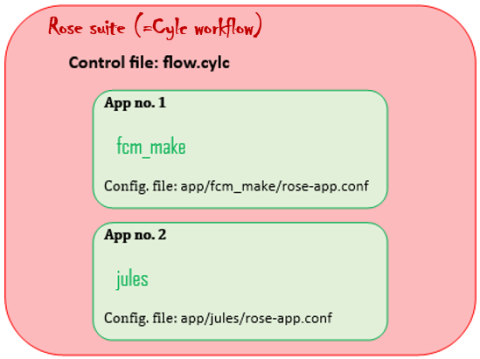
A Rose suite is a ‘container’ for apps. Workflows are held in a repository and all have an ID number, e.g. "u-aa005" (the "u" is the repository it is held in - "u" means "MOSRS" here - and the "aa005" is a unique identifier for the workflow). JULES Standalone suites always have two apps that run sequentially: fcm_make (the compilation step) and jules (actually running the model) (other kinds of workflow can have different apps, e.g. UM workflows can have apps fcm_make, fcm_make2, recon and atmos).

If you prefer to think about this in a more UNIX way, see screenshot: the JULES workflow is simply a directory on your file system (at location $RSUITE in my notes) that contains some files (including the textfiles rose-suite.conf and flow.cylc) and two subdirectories app/fcm_make/ and app/jules/. Kerry Smout-Day also illustrated the same structure nicely in her JULES tutorial here (although n.b. that webpage is for Cylc7, a little out of date).
By the way, DO NOT EVER RENAME A WORKFLOW (e.g. renaming u-bp696 above to u-bp696_workflow_for_project_P): as soon as you rename it, you will no longer be able to commit any changes to the repository (and that means you won't be able to generate any diffs like I can for u-bp696 using this link).
See the Rose documentation for more general information.
- How do I open/edit a suite? If the path on UNIX to the top level directory of your workflow is $RSUITE (i.e. if you do cd $RSUITE followed by ls then you'll see a file called "rose-suite.conf" and a directory called "app") then use a command like rose edit -C $RSUITE & . Alternatively, do cd $RSUITE followed by rose edit & (both are the same). ** Rose Edit is temporarily unavailable **
- How do I know which version of JULES a particular suite is designed for? Look at the end of the first line of $RSUITE/app/jules/rose-app.conf .
- How do I upgrade a suite from an older JULES version to a newer JULES version? There is an upgrade macro called rose app-upgrade, but that will only upgrade certain features of the workflow.
- How can I compare two suites to see where they differ? On UNIX (usually from the ~/cylc-src/ directory) use a command like kdiff3 $RSUITE1/app/jules/rose-app.conf $RSUITE2/app/jules/rose-app.conf & (requires kdiff3 to be installed on your system: if not, use diff instead but interface is not so nice). Or use kdiff3 $RSUITE1 $RSUITE2 & if you want to see all differences including compiler options, etc. .
- Where can I get an example suite? Suites for running JULES are available either via the Rosie Go system or via the roses-u repository: see here for how to use those.
- What is that flow.cylc file used for? The flow.cylc textfile (see bubble diagram above) controls how the apps of the suite relate to each other and the order in which they are run. You can specify complex and repeating runs of JULES using this (see e.g. here for using it to loop through a set of JULES runs with changing parameter settings). If you want to know more about how to use this, see the Cylc-Rose page and/or the Suite Design Guide and/or Kerry Smout-Day's tutorials on the JULES manual pages. For an example flow.cylc file, download any workflow on Rosie Go and look in the top directory.